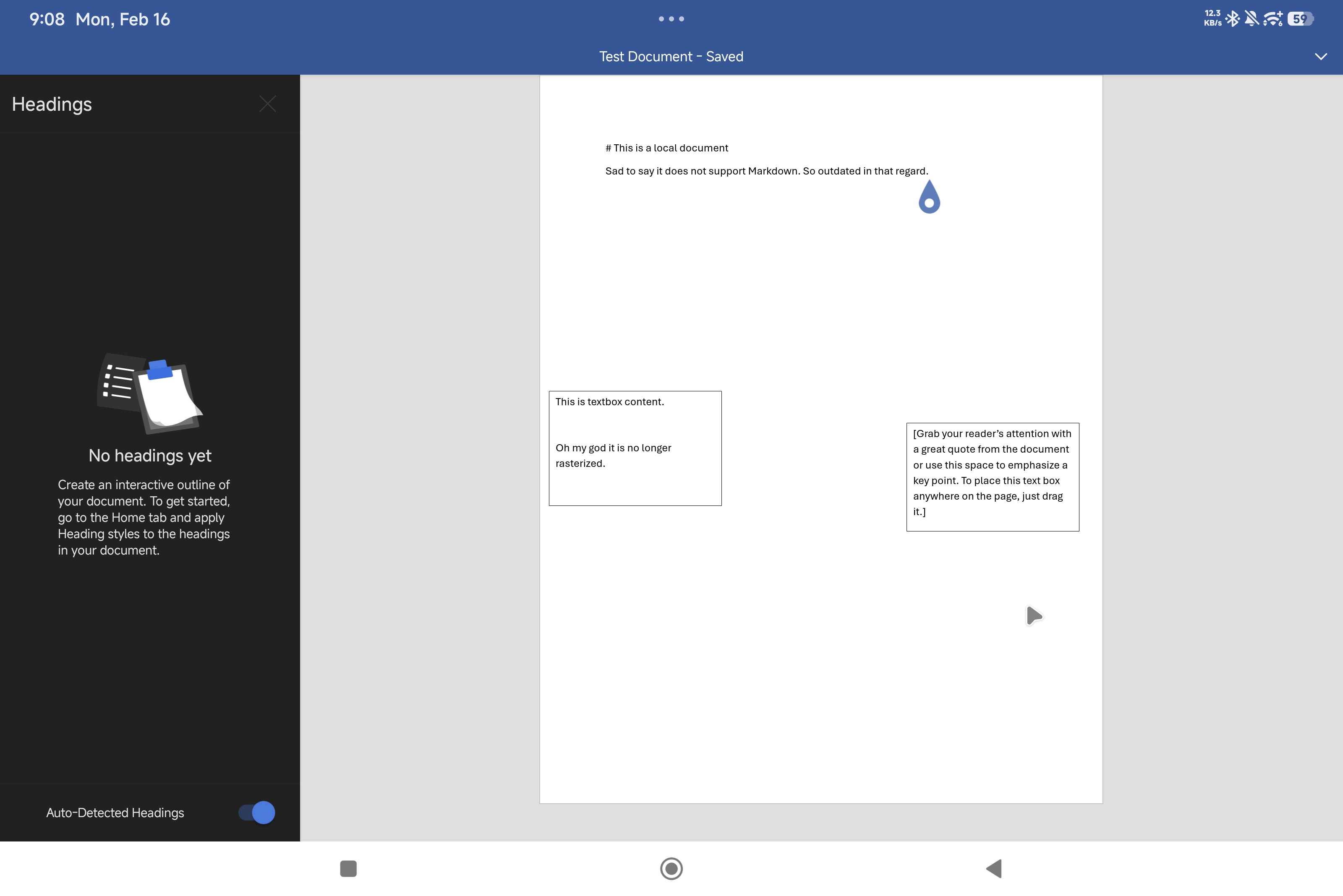
This is a post for celebration, because as much as the world slowly moves away from Microsoft, the scourge of legacy DOC and DOCX files remains. I remember writing before about my problems with editing DOCX offline on other platforms. I couldn't use Word Online, because it used to turn textboxes into images that distort on resize. Libre office cannot be run properly on Android. Google Docs will destroy document styles.
I don't know what possessed me to redownload Word for Android since that ordeal. Maybe because I've gotten a 3rd party focus keyboard for my Xiaomi Pad Pro 7, and it ramped up my productivity in this tablet by 11 (like really, tablets are really meant to be treated as ultraportable laptops -- it is the better Chromebook). My last post also dealt with using GDocs as a Todoist substitute. I guess, I thought it might be useful to try again using Word for Android. For the just in case I need to edit a Word Document and this Xiaomi is the only device in my disposal.
This is the Word for Android, the old Word, not the integrated Microsoft 365 Copilot that I've had awful experiences about, more so that it does not work on Xiaomi Pad Pro. Again, not the 365 Copilot that does not work on Xiaomi Pad Pro 7. Word for Android.
As of use, it has received a number of small but significant QOL upgrades. I can now create and edit local documents. I can use local storage as default save. Turning off wifi will not disable Word for Android functionality right away. There is also a heading sidebar.
But the textboxes. OMG the textboxes. They are no longer images. I can resize them. I can edit them without it showing a dialog. I can drag them from the touch screen. I can change the wrap behavior as to where they anchor their position. They share the same properties as Shapes (as it should, like it does on the Desktop version), and the Shape ribbon toolbar will show when you click on the textbox.
I have yet to check out if this feature is also implemented in the Web version. Because if it is, then I would say myself that Microsoft Word Online is a step closer to being a viable alternative to its desktop counterpart.
I am hoping that my personal blog post has something to do with this development. Because it has been so long that Word for Android has have any feature parity with Word for Desktop. And if it does, well... I am also asking for support with visible rulers for page view. And better access to document styles and document style creation. The design tab would also be a nice to have.
But I also have to admit that it is disappointing, really disappointing that GDocs is leagues above Microsoft 365 when it comes to collaboration and productivity. I am really enjoying the fact that I can use basic Markdown idioms and checklist bullets on GDocs. It makes it useful as a project management tool, and a backup for expiring Todoist subscriptions. Word is still it for legacy print solutions. But with Libre office gradually becoming a superior document solution, I don't know if there is ever a future for Word documents beyond name recall.